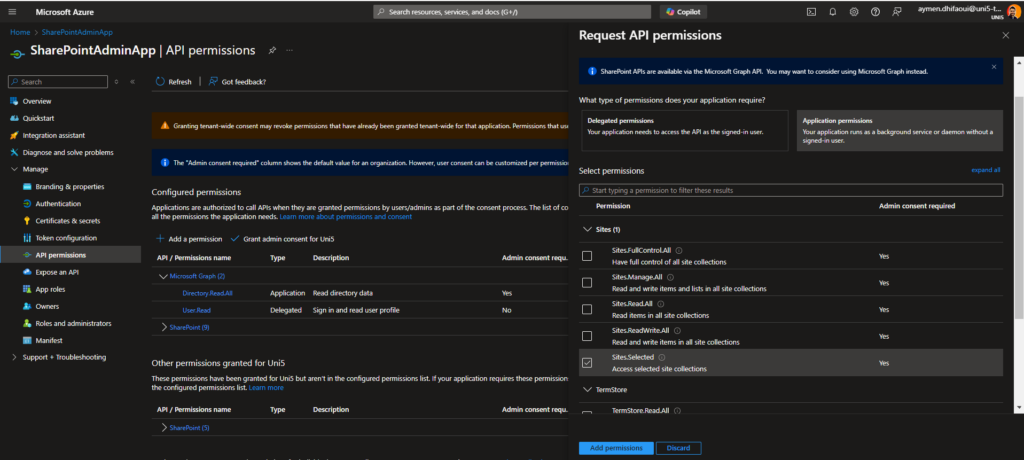

La gestion des autorisations passe désormais par Microsoft Entra ID (Azure AD) et l’API Microsoft Graph. Ces outils permettent d’implémenter des autorisations beaucoup plus granulaire et ciblées, comme Sites.Selected, qui améliorent la sécurité et la gestion des accès des applications.
 Fonctionnalités clés de Sites.Selected :
1. Contrôle Granulaire des Accès
Plutôt que de donner accès à toutes les applications sur l’ensemble des sites, les administrateurs peuvent désormais spécifier des sites particuliers auxquels les applications ont accès. Cela permet de minimiser les risques d’accès non autorisé à des données sensibles et de garantir que chaque application n’accède qu’aux ressources nécessaires.
2. Sécurité Renforcée
En limitant les permissions d’accès des applications à des sites SharePoint sélectionnés, les organisations peuvent mieux protéger leurs informations sensibles et répondre aux exigences des réglementations de protection des données. Ce modèle d’autorisation assure une couche supplémentaire de protection en permettant uniquement les accès critiques.
3. Gestion Simplifiée
Ils peuvent gérer les permissions spécifiques aux sites via le centre d’administration SharePoint ou des commandes PowerShell comme Grant-PnPAzureADAppSitePermission. Cela simplifie l’attribution et la révocation des accès, tout en maintenant un suivi rigoureux des autorisations. Les administrateurs peuvent choisir entre différents niveaux d’autorisation : FullControl, Read, Manage, Write.
🛠️ Étapes de Configuration :
1. Enregistrement de l’application dans Microsoft Entra ID
Commencez par configurer l’application dans Microsoft Entra ID (Azure AD) avec l’autorisation Sites.Selected pour SharePoint. Cela permet de gérer les accès spécifiques à certains sites au lieu de l’ensemble du tenant. Vous pouvez aussi définir d’autres niveaux de permission selon vos besoins.